
A drive reporting 128GB but holding only 32GB is capacity-faked, not faulty. How it works, the test that proves it, and what to demand before you pay.
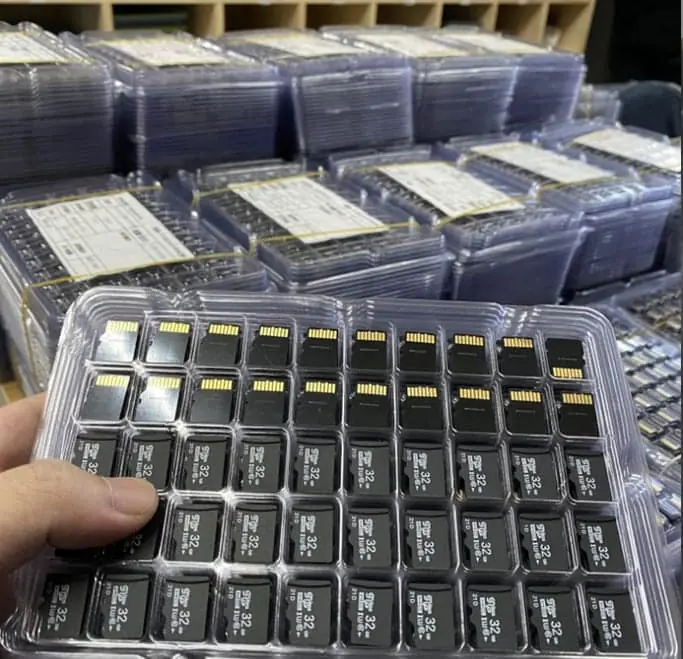
If a drive labelled 128GB holds only 32GB before files start to disappear or corrupt, it has been firmware-modified to report a fake size. The controller is told to report a larger capacity than the NAND physically present, so writes beyond the real limit wrap around and overwrite earlier data. The only reliable proof is a write-and-read-back test that fills the entire claimed capacity, such as H2testw or f3, and compares the returned file hashes. A quick file copy is not enough, because the damage only appears once you pass the real boundary.
The short answer
A drive that is labelled 128GB but holds only 32GB before files vanish is not faulty — it is capacity-faked. The controller has been programmed to report a size larger than the memory physically inside it.
There is exactly one way to prove it: fill the entire claimed capacity with real data and read it back. A folder copy does not count.
How a faked capacity actually works
A USB flash drive or memory card is a controller plus NAND memory. The operating system never talks to the NAND directly; it asks the controller how big the media is and trusts the answer.
Faking edits that answer. The controller is configured to report, say, 128GB when the NAND behind it is 32GB. Three things then happen in sequence:
- It looks fine. Explorer, Finder and Disk Utility all report the larger size. You can format it, and it will format successfully.
- It works for a while. Files written first land in real memory. A few gigabytes of photos copy over without complaint, which is why the buyer concludes the drive is good.
- It fails silently at the boundary. Once writes pass the real capacity, the controller has nowhere to put them, so it wraps around and overwrites the oldest data. The new file looks saved. The old file is gone — often without any error message.
The defining feature of a faked drive is not that it fails, but that it fails late and quietly. By the time you notice, the data you were relying on is already damaged.
That is also why the problem is common in exactly the use cases where it hurts most: wedding photos, a music library handed out as an album, a student’s coursework archive, a shop’s backup drive.
Why a quick test always passes
Most buyers test a new drive by copying a folder onto it and opening a couple of files. That test is structurally incapable of detecting the problem.
A folder of typical documents is a few hundred megabytes. It lands entirely inside the first few gigabytes, which is real memory. Every file opens, the drive appears perfect, and the buyer places a bulk order.
The failure only becomes visible once the total bytes written exceed the real capacity. On a genuine 32GB drive sold as 128GB, that means the problem appears at roughly a quarter of the way through — after the buyer has already trusted it.
The test that does work
A capacity test does three things a file copy does not: it writes until the media is full, it writes a known pattern, and it reads every byte back and compares.
| Test method | What it proves | What it misses |
|---|---|---|
| Copy a folder and open files | That some memory works | Anything past the real capacity |
| Check the reported size in Explorer | Nothing | The reported size is the lie |
| Format the drive | Nothing | Formatting succeeds on a faked drive |
chkdsk / disk repair | Fixes directory errors | Cannot create missing NAND |
| Write-to-full plus read-back with checksums | Real usable capacity | Nothing relevant |
The tools are free and well established: H2testw on Windows, and f3 (f3write followed by f3read) on Linux and macOS. Both write real files until the drive is full, then read them back and verify.
Reading the result
- Pass: the tool reports the full claimed capacity written and verified, with zero corrupted files.
- Fail: the tool stops early, reports a smaller usable size, or lists corrupt files starting at a specific point.
The starting point of the corruption is diagnostic. Corrupt files beginning at about 25 percent of a 128GB drive points to roughly 32GB of real NAND — which tells you what the drive actually is, not just that it is bad.
How long it takes
Capacity testing is slow because it is real I/O. Writing and reading a large drive can take hours at USB 2.0 speeds and considerably less at USB 3.0. This has a consequence for procurement that buyers rarely think about: a supplier who claims to test every unit at volume must have the equipment and the hours to do it, and you can ask them to describe both.
What to do with a drive that fails
- Stop using it as storage immediately. Do not attempt to recover data onto the same drive.
- Assume earlier copies are damaged. If it was used as a backup target, that backup is not a backup. Rebuild it from the source.
- Preserve the test report. A screenshot of the failing run, with the tool name and version, is the evidence you need for a refund or a dispute.
- Do not try to “repair” it. There are utilities that reset a controller’s reported capacity, but they cannot add memory. The drive remains a small drive wearing a large label.
What to ask before you place a bulk order
The useful questions are not “is it real capacity” — every supplier will say yes — but about method and evidence.
| Ask | A good answer | A weak answer |
|---|---|---|
| What test do you run? | Names a write-and-read-back tool | “We test 100%” |
| Do you test every unit or sample? | States which, and why | “All tested” with no method |
| Can you send the report for my batch? | Yes, with capacity written and verified | Sends a generic datasheet |
| How long does the test take per unit? | Gives a realistic time | Cannot say |
| What happens if my incoming test disagrees? | States a replacement or credit term | Changes the subject |
The last row matters most. Any supplier can be wrong once; the question is what they have agreed to do when the test disagrees with the label.
Why this is worth paying attention to as a category
Faked capacity is not a rare defect. It is an established business model in some channels, because the fraud is cheap to execute, invisible at the point of sale, and only discovered by the end user weeks or months later — usually after the shipment has been paid for and the seller has moved on.
For a buyer distributing into a market where the product will be resold, the exposure is worse than the unit cost. A batch of faked drives reaching retail customers turns into returns, chargebacks and reputational damage that dwarf the purchase price.
The practical rule: test the batch you receive, not the sample you were shown. The sample is the one unit the supplier chose.
If you want the procedure we use on incoming goods, the sample acceptance checklist covers what to record and what counts as a failure, and how to verify a flash card really holds the capacity it is sold as goes deeper on card-specific behaviour. For the arithmetic behind why a 128GB drive shows about 119GB in an operating system — a normal, unrelated effect — see nominal vs usable capacity. That difference is decimal versus binary units and is expected; a drive that shows 32GB is a different problem entirely.
Sources
Frequently asked questions
How can a 128GB drive actually be only 32GB?
The controller chip carries firmware that tells the operating system what capacity to report. In a faked drive, that number is edited upward so the drive advertises 128GB while the NAND behind the controller holds far less. The file system accepts the larger size, so the drive looks normal in Explorer or Finder. The corruption starts silently when writes pass the real limit: the controller discards or overwrites older data to keep accepting new writes, and files written earlier become unreadable or the drive drops to read-only.
Will formatting or a chkdsk fix it?
No. The problem is below the file system layer, in the controller's reported geometry. Formatting rewrites the file allocation table but the controller still lies about how much media exists. chkdsk can repair directory structures, so it may appear to help for a short time, but it cannot create NAND that is not there. A faked drive that has been re-formatted will pass a fresh file copy of a few gigabytes and fail again once the real capacity is exceeded.
What is the quickest way to test a drive's real capacity?
Use a tool that writes files until the drive is full and then reads every file back, comparing checksums — H2testw on Windows and f3 (or f3write and f3read) on Linux and macOS are the standard choices. These write real data across the whole claimed capacity, so the wrap-around point gets tested. A test on a large-capacity drive takes time in proportion to its size; running it overnight is normal. Any test that only copies a folder of files proves nothing, because the files land in the first few gigabytes.
What result counts as a pass?
The tool must report the full nominal capacity written and verified, with zero corrupted files. Watch two figures: the total megabytes written should roughly equal the claimed capacity in decimal terms, and the read-back verification should report the same byte count with no errors. If the tool stops early, reports less capacity than claimed, or reports corruption at a specific percentage of the way through, treat the previous data on that drive as already at risk.
Can a fake drive damage the computer it is plugged into?
It is unlikely to cause physical damage through a standard USB port, but it can damage your work. The more common harm is data loss: files you believe are stored are silently overwritten, and backup routines that report success are recording corrupt archives. If a faked drive was used as a backup target, the backup is worthless and should be rebuilt, not repaired.
What should I ask a supplier before ordering a batch?
Ask for the test method, the tool used, and a report from the actual batch you will receive, not a generic datasheet. A supplier who tests every unit can send a report that lists capacity written, capacity verified, and any errors. Ask also how they test at volume: a claim of 100 percent testing is only credible if they can describe the equipment and the time it takes, because writing and reading every byte of a large card is slow work and cannot be skipped.
Is a cheap card on a marketplace always fake?
Not always, but the price and the capacity together are the signal. A drive priced far below the going rate for its stated capacity, sold without a brand or with a vague brand, is the classic profile. Legitimate low-cost product exists mainly in small capacities where older NAND is genuinely cheap, so a suspiciously cheap 512GB drive is a much stronger warning than a suspiciously cheap 8GB one.