
USB 2.0 High-Speed is 480 Mbit/s raw; USB 3.2 Gen 1 is 5 Gbit/s. But a flash module rarely saturates either. Learn when the faster interface earns its cost and when it is dead weight on your BOM.
TL;DR
USB 2.0 High-Speed runs at 480 Mbit/s raw; USB 3.2 Gen 1, the spec once called USB 3.0, runs at 5 Gbit/s raw, with Gen 2 at 10 Gbit/s and Gen 2x2 at 20 Gbit/s. But a flash module is only as fast as the NAND and controller behind the port, and many builds never approach even 480 Mbit/s in real writes. Paying for USB 3.x on a module that cannot feed the pipe is dead weight on your BOM. Reach for the faster interface when the media is fast and the host exercises it — bulk backup, imaging, regular large transfer — and stay on USB 2.0 for promo tokens and read-mostly use. WINTEL builds UDP modules from 128MB to 128GB with the interface specified to the media, not the catalogue.
The numbers are real, the benefit is conditional
The signalling rates are not in dispute. USB 2.0 High-Speed is 480 Mbit/s raw. USB 3.2 Gen 1 — the line the market still calls USB 3.0 — is 5 Gbit/s raw. USB 3.2 Gen 2 is 10 Gbit/s and Gen 2x2 is 20 Gbit/s. The marketing names were renamed along the way, so USB 3.0, USB 3.1 and USB 3.2 Gen 1 are the same 5 Gbit/s tier wearing different badges.
That is the easy part. The hard part is that none of those numbers describe your module until the NAND behind them can sustain them. A port rated for 5 Gbit/s connected to media that writes at 200 Mbit/s is a 5 Gbit/s port delivering 200 Mbit/s. The interface was not the bottleneck; the flash was.
Most modules never fill USB 2.0
This is the fact suppliers under-state. A great many flash modules, especially cost-sensitive custom builds, peak below 480 Mbit/s in real sequential write. The controller, the grade of die and the packing all cap the throughput before the bus does. Put a USB 3.x port in front of that media and the extra 4.5 Gbit/s sits empty.
So the question is never “is USB 3 faster” — it is “can my module use it.” If the answer is no, the faster interface is a label, not a feature. A buyer who pays for Gen 1 on a 200 Mbit/s module has bought a number for the spec sheet and nothing for the user.
USB 3.x earns its place on fast media
There are modules that do justify it. A build with fast NAND and a controller tuned for bulk transfer, feeding a host that actually moves large files, will use the headroom — image deployment, sequential backup, regular large-file sync. There the 5 Gbit/s pipe removes a real bottleneck and the transfer time drops in proportion.
But notice the chain: fast NAND AND tuned controller AND a host that exercises it. Break any link and the premium evaporates. A fast interface on a module whose die grade caps the write is the same dead weight as before, just more expensive.
When USB 2.0 is the right answer
For the bulk of custom flash — promo tokens, read-mostly licence keys, small-file carriers, lightweight boot media — USB 2.0 is enough and the 3.x premium is waste. The user never sees the difference because the workload never approaches the 480 Mbit/s ceiling. Paying for Gen 1 there is paying for a capability the product cannot demonstrate.
Do not let a supplier upsell the interface on a token. The right question is the workload against the media, not the fastest badge on the shelf. If a quote leads with USB 3.2 on a 128MB giveaway, that is a label sale, not an engineering call.
The renaming trap in the quote
The renamed marketing names create confusion a careless quote exploits. USB 3.0 became USB 3.2 Gen 1; USB 3.1 became USB 3.2 Gen 2. A buyer comparing “USB 3.0” against “USB 3.2 Gen 1” may think they are different tiers when they are the same 5 Gbit/s. The mismatch is usually ignorance, but it still produces a wrong order.
Pin the rate, not the name. Ask for the raw signalling rate in the quote — 480 Mbit/s, 5 Gbit/s, 10 Gbit/s, 20 Gbit/s — so the comparison is numeric, not lexical. A supplier who can state the rate is a supplier who knows what they are building.
Matching interface to media on the BOM
The discipline is to specify the interface against the die grade and the workload, in that order. Fast NAND plus bulk transfer justifies USB 3.x. Slow media or light duty does not. The BOM line should read as a matched pair, not as the fastest port available bolted onto whatever die was cheapest.
A module where the interface outruns the media is over-specified and over-priced. A module where the media outruns the interface is a bottleneck the user feels on every large copy. The right answer is the one where the two meet, and that meeting point is lower than most quotes assume.
How WINTEL specifies the port
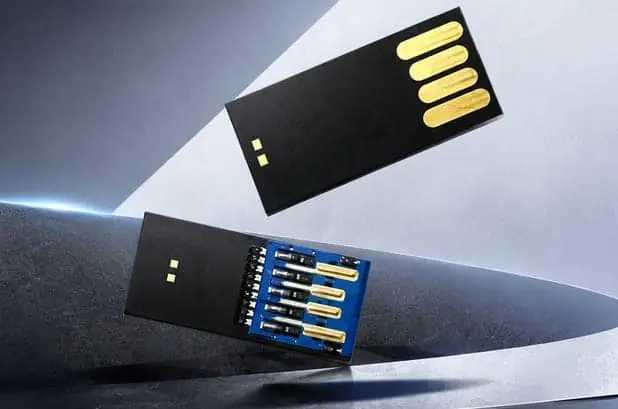
WINTEL supplies UDP modules from 128MB to 128GB at 11.3 × 24.8 × 1.45 mm and 0.819 g, with read/write speed specified per order, and TF cards from 4GB to 256GB at 15 × 11 × 1 mm and 0.25 g. The interface — USB 2.0 or USB 3.x — is chosen against the actual media and the host you name, not against the fastest option on the list.
Send us the host and the workload and we will tell you whether USB 3.x will be felt in the transfer or only seen on the label. If it will not be felt, we will specify USB 2.0 and keep the cost where it belongs.
The cheapest mistake and the expensive one
The cheap mistake is over-paying for an interface the media cannot use. The expensive mistake is the mirror: specifying USB 2.0 on a fast module meant for bulk backup, then watching transfers crawl against a port that was the bottleneck after all. Both come from the same root error — picking the interface without the media.
Specify the pair. The port and the NAND are one decision, and the BOM should show it as one.
A bench test that settles the argument
You do not have to trust the badge. Plug the module into a host, copy a large file both ways, and measure the real MB/s with a tool rather than reading the label. If the result sits near 480 Mbit/s, about 60 MB/s, the interface is not the limit and USB 3.x is decoration on the BOM. If it climbs past that ceiling, the faster port is earning its place and you should keep it.
That one measurement ends the upsell. A supplier who resists a bench number is selling the port, not the performance, and the module you build should reflect what the media can actually do. The label boasts a rate the NAND may never reach; only a copy test tells you the truth, and the truth is what belongs on the specification, not the hope.
If you want the interface matched to your media instead of the fastest label, send us the host and the workload. We will specify USB 2.0 or USB 3.x against the NAND, not the catalogue.
Reach the team at cathy@go-wintel.com or open the request a quote form.
Sources
Frequently asked questions
How much faster is USB 3.0 than USB 2.0?
USB 2.0 High-Speed is 480 Mbit/s raw. USB 3.2 Gen 1, the spec formerly called USB 3.0, is 5 Gbit/s raw; USB 3.2 Gen 2 is 10 Gbit/s and Gen 2x2 is 20 Gbit/s. The marketing names were renamed, so USB 3.0, USB 3.1 and USB 3.2 Gen 1 are the same 5 Gbit/s line.
Does my flash module actually use that speed?
Often not. The interface is only as fast as the NAND and controller behind it, and many modules top out well below 480 Mbit/s in real writes. A faster interface buys headroom the storage cannot fill, so the user sees no change. Match the interface to the media, not to the catalogue.
When is USB 3.x worth paying for?
When the module carries fast NAND and the host will exercise it — large sequential backups, imaging, regular bulk transfer. If the duty is small promo files or a read-mostly token, USB 2.0 is enough and the 3.x premium is dead weight on the BOM.
What does WINTEL offer on interface?
WINTEL supplies UDP modules from 128MB to 128GB at 11.3 × 24.8 × 1.45 mm and 0.819 g, with read/write speed specified per order. Tell us the host and the workload and we will specify USB 2.0 or USB 3.x against the actual media, not the fastest label available.