
Flash memory does lose data without power — faster with capacity, heat and age. What retention really means and how to archive gifts that must last a decade.
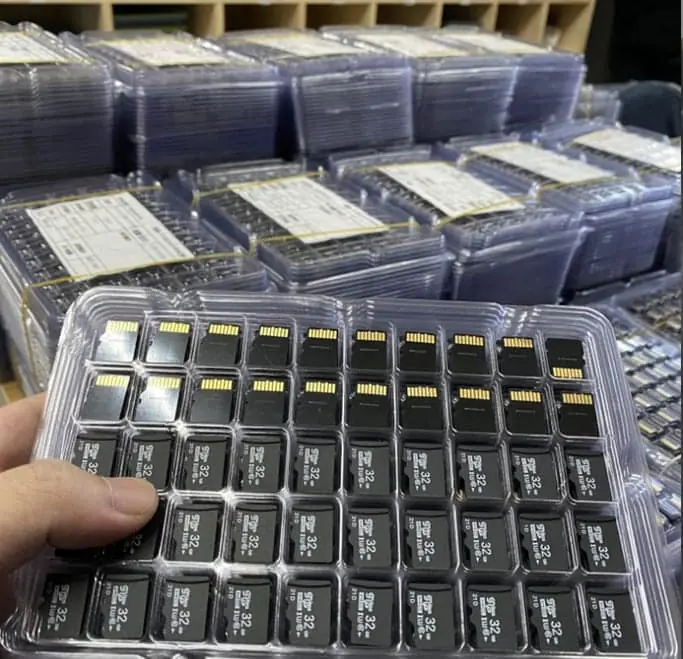
Flash memory does hold its data without power, but not indefinitely. Retention is specified as a period under stated conditions — typically years at moderate temperature, and much shorter at high temperature or after heavy write cycles. The charge stored in each cell leaks slowly, and the leak rate rises steeply with temperature. Small-capacity, lightly used devices hold data longest; large-capacity, heavily rewritten devices hold it for the shortest time. For an archive that must last a decade, a single flash device is the wrong medium.
The short answer
Yes, flash memory loses data without power — slowly, and at a rate that depends on conditions.
There is no single “shelf life”. There is a retention period under stated conditions. Change the conditions and the period changes, sometimes by a lot.
| Factor | Effect on retention |
|---|---|
| Storage temperature | Largest effect — warmer means shorter |
| Write cycles already endured | More cycles means shorter |
| Bits per cell (SLC → TLC → QLC) | More bits means shorter |
| Capacity | Higher capacity usually means shorter |
| Write quality at time of writing | A clean, full write lasts longer |
| Regular use | Reads and rewrites refresh the data |
Why the charge leaks
Every flash cell stores data as a quantity of electrical charge trapped in an insulated structure. The insulation is excellent but not perfect, and charge leaks away over time. When enough has leaked, the cell no longer reads as the value that was written.
Three things accelerate that leak:
Temperature. Leakage is thermally driven. This is why retention figures are always quoted at a temperature and why a drive left in a hot car is a different proposition from one in a drawer.
Smaller cells with more levels. To store three or four bits per cell instead of one, the controller must distinguish between several voltage levels inside a narrow window. Less separation means less margin for leakage. Add the shrinking process node — less charge stored per cell — and the direction of travel is clear.
Wear. Writing and erasing stresses the insulating layer. A worn cell leaks faster than a fresh one, which is why retention on a new device overstates what an old one will do.
The uncomfortable implication is that the drives most people use for archiving — large-capacity, cheap, heavily reused — are the ones with the shortest retention.
What retention means on a specification
Manufacturer retention figures are usually stated as a period at a temperature, for a stated number of write cycles, at end of life. That last qualifier matters: a figure of “one year at 55 °C after rated endurance” describes a worst case, not a typical case. A lightly used device stored at room temperature will comfortably exceed it, which is why real-world drives usually work after years in a drawer — and occasionally do not.
The practical planning posture is:
- Treat retention as a range, not a promise. Plan for the lower end.
- Treat the specification temperature as a stress condition, not the expected environment.
- Never treat a single flash device as the only copy of anything you cannot recreate.
The archiving problem, concretely
The hardest version of this question comes from gift and keepsake projects: a graduation drive holding a student’s files, an album handed out at a launch, a commemorative drive meant to sit on a shelf for a decade.
Three properties make this case difficult:
- The data must survive with no maintenance — the recipient will not plug it in to refresh it.
- The storage conditions are unknown and uncontrolled — a drawer, a shelf, a box in a loft.
- The device is often the only copy, and the value is emotional rather than commercial, which makes a failure much worse than the unit cost.
| Approach | Retention | Practical for a gift? |
|---|---|---|
| One flash drive, unverified storage | Years, highly variable | Common, and the risk |
| Two drives from different batches | Same per device, lower joint risk | Yes — the minimum sensible option |
| Flash drive plus printed or cloud copy | Better — different failure modes | Yes, if the content allows |
| Flash drive plus optical disc | Better — independent media | Yes, for long archives |
| Managed cloud with integrity checks | Best, but needs an account | Yes, if the recipient will maintain it |
The recommendation for a keepsake is not a better drive. It is two drives from different production batches, plus a note telling the recipient to copy the contents within a few years. The batch point matters: two drives from the same batch share the same components and can fail together.
What to do with a drive that has been unused for years
- Do not assume it is readable. Copy the contents off before doing anything else.
- Check for corruption, not just presence. A file that opens is not proof; compare checksums or open the files that matter.
- Copy, do not move. Keep the original untouched until a verified copy exists on a different device.
- Then refresh. If the drive will continue to be used for storage, rewrite the data onto a fresh device rather than back onto the worn one.
What to ask a supplier when retention matters
For a project where the drive is an archive rather than a working tool, four questions are worth putting in writing:
- What memory type is in the drive, and how many bits per cell?
- Is the drive new stock or has it been used or re-marked?
- Can the batch be split across production runs, so that two copies do not share components?
- What is the stated retention condition for this memory?
The third question is the one almost nobody asks, and it is the one that most reduces the risk of both copies failing together.
For how retention relates to endurance and field failure in normal use, see why units fail in the field. For the difference between the memory types named on a specification, SLC vs MLC vs TLC explains what the cell types actually change. And if the project involves pre-loading content, can I preload my software onto custom USB drives covers how the write is done and verified.
Sources
Frequently asked questions
How long will a USB drive hold data without being plugged in?
There is no single number, because retention depends on the memory type, the number of write cycles the drive has already taken, the capacity, and above all the storage temperature. Manufacturer specifications generally state retention for a defined period at a defined temperature, and the realistic planning figure for a lightly used device kept at a stable room temperature is measured in years rather than months. A heavily rewritten drive stored in a warm place can lose data far sooner.
Why does higher capacity mean shorter retention?
Because of how the cells are built. Modern high-capacity flash uses more bits per cell — three or four levels rather than one — which means the difference between voltage levels is smaller and therefore easier to disturb by leakage. Cells are also made at smaller process nodes, which reduces the amount of charge stored. A high-capacity drive crams more data into the same die area and has less margin against leakage, so it holds its data for less time under the same conditions.
Does temperature really matter that much?
It is the single largest controllable factor. Charge leakage accelerates sharply as temperature rises, so the same drive stored in a cool, dry place will retain data substantially longer than one stored in a warm room, a car, or a loft that fluctuates. Manufacturer retention figures are quoted for a specific temperature; every degree above it shortens the period, and the relationship is not linear.
Is a drive that has been heavily used worse for archiving?
Yes. Each write cycle stresses the oxide layer that holds the charge, and a drive that has been rewritten many times has more worn cells and more weak cells. Retention tests on new devices overstate what an old, heavily used device will do. If a drive is destined to hold an archive, write to it once and store it, rather than using it as working storage and then archiving it.
What should I do if the drive must survive ten years?
Do not rely on one device. Flash is a working medium, not an archival one. The practical approach is redundancy across different media and periodic verification: keep at least two copies on different devices from different batches, store them cool and dry, and check and refresh the data at intervals. For genuinely long-term archives, optical media or a managed cloud copy with integrity checking is a better primary than a flash drive.
Does unplugging a drive 'charge' it or damage it over time?
Unplugging does not damage it, and there is no maintenance charge to apply. The device simply holds the charge already written into its cells, and that charge leaks. The only refresh mechanism is reading and rewriting the data — a controller does this internally during normal use, which does not happen while the drive sits in a drawer. That is precisely why long-unused drives are more at risk than drives in regular use.