
Flash memory is addressed in powers of two, so every standard capacity is a power of two multiplied by a whole number of flash dies. A request for 36GB is not a matter of price or effort — there is no die configuration that produces it. Here is the arithmetic, the capacities that do exist, and how to get a capacity that is close without being non-standard.
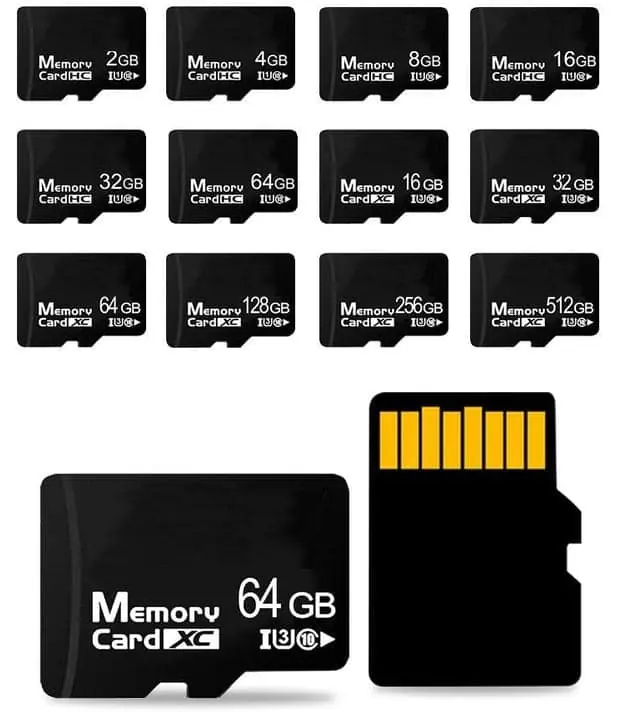
A 36GB flash product does not exist because the address space of flash is binary. One gigabyte in the manufacturer's decimal sense is 1,000,000,000 bytes; a binary gigabyte (GiB) is 2^30 bytes. Flash capacity is built out of dies, each die is sized in binary, and the interface addresses memory with address lines that produce powers of two. Standard capacities are 2^n gigabytes or small whole-number multiples of them — 32GB, 64GB, 128GB — and 36GB is not among them. If you specify 36GB, the honest answer is not a longer lead time or a higher price. It is that the number has no parts behind it. Move to 32GB or 64GB and specify the usable capacity you actually need instead.
The request is reasonable. The number is not buildable.
A buyer with an application that needs a bit more than 32GB has an obvious instinct: ask for 36GB. It sits neatly between two standard steps, it is only slightly larger than what is clearly too small, and it feels like the kind of thing a factory should be able to arrange.
It cannot be arranged. Not because the factory is inflexible, and not because the quantity is small. Because the arithmetic that produces flash capacity does not output that number.
This is worth writing down plainly, because the conversation usually goes wrong in a predictable way. The buyer asks for 36GB. The supplier quotes 32GB. The buyer reads that as a negotiation, assumes the supplier is steering toward stock, and pushes back. Three emails later somebody is annoyed about something that was never a commercial question at all.
Where a capacity number actually comes from
Flash capacity is assembled from dies. Each die holds a fixed number of bits, and the interface addresses that array with address lines. Address lines are binary: each one doubles the addressable range. Sixteen lines address 65,536 locations, seventeen address 131,072, eighteen address 262,144. There is no address line that multiplies by 1.125.
The host sees that same binary structure. Megabytes, gigabytes and terabytes are counted in multiples of 1,024 in the addressing model the controller and the operating system share. Whatever the marketing number on the front of the package, the array behind it is organised in powers of two.
So the set of capacities you can build is the set of numbers that are a power of two, or a small whole-number multiple of a power of two, times the size of an available die. That set contains 4, 8, 16, 32, 64, 128, 256, 512. It does not contain 36, 48, 96 or 200.
| Requested | Buildable as a standard part? | Nearest standard steps |
|---|---|---|
| 36GB | No | 32GB, 64GB |
| 48GB | No | 32GB, 64GB |
| 96GB | No | 64GB, 128GB |
| 200GB | No | 128GB, 256GB |
“But someone online sells one”
They do, and it is worth understanding what is being sold.
Two different things can produce a non-standard capacity number on a label. The first is a genuine configuration: a larger array with the controller instructed to expose only part of it, or a stack of dies combined in an unusual ratio. These are real products and they work correctly. They are also priced off the larger array, because that is the silicon you are paying for. A 36GB part built this way is more expensive than a 64GB part, not less, which is why you rarely see one quoted.
The second is a firmware change with no array behind it. The controller reports a capacity larger than the memory that exists, and once the host writes past the real end, data stops being stored — silently. This is the mechanism behind the cheap oversized drives that fail a full-capacity test at the halfway point. A buyer who finds a 36GB product online at a good price has, almost certainly, found the second kind.
The distinction matters because both look identical in the operating system. The only way to tell them apart is to write the full claimed capacity and read it back, which is what a full-capacity verification does.
The decimal-versus-binary confusion underneath all of this
There is a second reason capacity numbers feel wrong, and it is unrelated to dies.
Flash is sold in decimal gigabytes: 1GB means 1,000,000,000 bytes. Most operating systems display binary gigabytes: 1GB on screen means 2^30, which is 1,073,741,824 bytes. The second unit is about 7.4 percent larger, so the same physical card reads as a smaller number.
The conversion is simple. Take the label capacity and divide by 1.0737.
| Label | Reported in binary units | Apparent shortfall |
|---|---|---|
| 16GB | about 14.9GB | about 1.1GB |
| 32GB | about 29.8GB | about 2.2GB |
| 64GB | about 59.6GB | about 4.4GB |
| 128GB | about 119.2GB | about 8.8GB |
Nothing is missing. The same bytes are being counted with a bigger ruler. Two further deductions apply in practice: the file system reserves space for its own structures, and a flash device holds spare blocks that are never exposed to the host at all. On a large card these are small; on a card near the bottom of its band they are a visible fraction.
This is why a buyer who orders 36GB in the hope of getting “32GB plus a margin” ends up disappointed twice — once because the part does not exist, and once because the part that does exist reports less than its label.
The capacities that do exist, and where each one stops making sense
The commercial ladder is stable because it follows the silicon. What changes is which step is the sensible one to stand on.
| Band | Typical use | What to watch |
|---|---|---|
| 128MB – 2GB | Promotional and branded drives, firmware bundles, legacy hosts | Cost is dominated by assembly and branding, not by the die. Confirm the host even reads it. |
| 4GB – 16GB | Industrial loggers, point-of-sale, small OS images | Cheap and plentiful. Avoid the cheapest: downgraded dies concentrate in this band. |
| 32GB – 64GB | General product bundles, in-vehicle recording, gift and graduation sets | The widest price-per-byte plateau. Most custom projects land here. |
| 128GB – 256GB | High-capacity bundles, media libraries, professional use | Speed becomes the differentiator, not capacity. Sustained write is what buyers should test. |
| 512GB and above | Specialist and premium products | Die stacking raises cost steeply and heat becomes a design constraint. |
Notice what happens across that table. Below 32GB, the die is a small part of the total cost, so customisation and assembly dominate and small capacities remain viable. Above 128GB, capacity stops being the interesting question and speed starts. Only in the middle does the capacity number itself carry meaningful price weight — and the middle is exactly where buyers try to fine-tune it to 36GB.
What to write in the specification instead
If the real requirement is “enough room for our data with headroom”, the capacity on the label is the wrong instrument. Specify three things instead.
A standard label capacity. Pick the step above what you need. Asking for a standard capacity keeps you inside a price band the factory can actually quote, and keeps you inside a test programme that already exists.
A usable-capacity floor. State what must remain free after formatting, in the units your software counts in. “After formatting and with the application installed, free space must not fall below X” is a clause an inspection can measure. A label of 36GB is not.
A test method. Full-capacity write and read-back, with the report supplied. This is the only check that separates a genuine part from one whose controller was told a story. It is also cheap, and it catches the failure that matters most.
An illustrative comparison, not a WINTEL specification
Suppose a logger needs to retain six months of records at roughly 4GB per month, so about 24GB of data plus room for growth. The instinct is to ask for 36GB. The better specification reads: a 64GB standard part, formatting in the file system the host supports, a free-space floor of 30GB after the application is installed, and full-capacity verification on the delivered batch. That specification is quotable, testable and buildable. The 36GB version is none of the three.
The question behind the question
Almost every request for a non-standard capacity is really a request for a cost shape. The buyer wants the smallest part that will do the job, because the next standard step up costs more and the jump feels like waste.
That instinct is correct and worth honouring. The answer is not to shrink the number arbitrarily, though — it is to find the capacity step where the price curve is flat. Between 32GB and 64GB the price difference per unit is usually smaller than the cost of a custom configuration, a custom test programme and the re-qualification that goes with them. Spending engineering effort to land on 36GB costs more than buying 64GB and never thinking about it again.
Ask for the standard step, and spend the energy on the two things that do move the outcome: what the usable capacity floor is, and whether the batch was verified in full.
Frequently asked questions
Is there really no such thing as a 36GB flash drive?
Not as a standard part. Capacities are built from flash dies addressed in binary, so the available numbers cluster around powers of two: 4, 8, 16, 32, 64, 128, 256 GB. Some intermediate points exist where dies are combined in unusual ways or where a controller is configured to expose part of a larger array, but these are carved out of a bigger capacity, not built up to an arbitrary number. A 36GB product would waste most of a 64GB array, which is why nobody offers it at a competitive price.
Why does my 64GB card show 59.6GB in Windows?
Two conventions meet. The manufacturer's gigabyte is 10^9 bytes; Windows reports gigabytes as 2^30 bytes, which is about 7.4 percent larger. Divide 64 by 1.0737 and you land near 59.6. The card does not have less capacity, it has the same bytes counted with a larger unit. On top of that, formatting reserves space for the file system's allocation tables, and a flash device holds spare blocks for bad-block management that are never exposed to the host.
Can a factory make a custom capacity like 36GB if I pay for it?
Paying does not create the parts. What a factory can do is take a larger array and configure the controller to expose a smaller logical capacity — but the physical memory still costs what it costs, so the saving is zero or negative, and you would be buying a 64GB bill to store 36GB. The practical route is to specify a standard capacity and state the usable capacity and free-space floor your application needs.
What capacities are actually available?
For TF and microSD cards the common commercial bands run from 4GB to 256GB, with 128GB and 256GB now mainstream and 512GB available at the top of the range. USB flash drives follow a similar ladder and extend higher, to 512GB and beyond with multi-die stacks. Below 4GB, 128MB, 256MB and 512MB remain available for branded promotional drives, because the capacity is small enough that the die cost is no longer the driver.
If I need exactly 36GB of usable space, what should I specify?
Specify a 64GB part and state the floor you need — for example, free space after formatting must not fall below 36GB. That gives the supplier a measurable acceptance criterion instead of an impossible capacity, and it leaves room for the file system, spare blocks and the growth of your own application data. The number on the label and the number your software can use are two different specifications.