
Clinic buyers almost always over-specify capacity and under-specify the two things that cost them a recall: build consistency and how the drive is labelled for the imaging software. You need 8-16GB of real, verified capacity, a fixed bill of materials across every reorder, FAT32 with a fixed volume label, and a sample you have tested in your own scanner before the first batch ships.
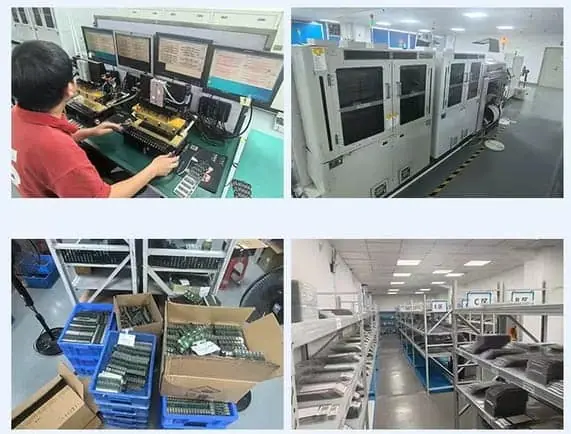
For dental and medical imaging use, capacity is the least important specification. Buy 8-16GB of verified real capacity (imaging exports are small), lock the bill of materials so reorders behave identically, format FAT32 with a fixed volume label your imaging software already recognises, and test one sample in your own scanner before releasing the first batch. The failure that hurts a clinic is not a slow drive — it is a drive that writes patient images into a corrupted area and reports success.
The short answer
For dental and medical imaging, capacity is the least important thing you will specify. Imaging exports are small. What costs a clinic is not a slow drive — it is a drive that writes patient images into a corrupted area, reports success, and is discovered months later when someone tries to reopen a scan.
So the priorities invert compared with ordinary office buying:
| Priority | What to buy | Why |
|---|---|---|
| 1 | Verified real capacity, 8-16GB | Silent data loss is the only failure that really hurts |
| 2 | Fixed BOM across reorders | The drive in year three must behave like the drive in year one |
| 3 | FAT32 + fixed volume label | Imaging software and staff workflows depend on it |
| 4 | Sample tested in your own scanner | Your equipment is the only real acceptance test |
| 5 | Speed | Almost irrelevant at these file sizes |
Why the capacity conversation is upside down
Buyers coming from consumer electronics assume more capacity is safer. In a clinic it works the other way.
A full intraoral X-ray series is typically tens to a few hundred megabytes. A CBCT export runs larger but still usually well under a gigabyte. A patient folder with photos, radiographs and notes rarely passes 1-2GB.
That means 8GB covers most clinics and 16GB is generous. Going to 64GB or 128GB does not buy safety — it moves you into denser NAND, where counterfeit and under-capacity product is more prevalent, and where the cost of being wrong is higher.
The failure mode nobody sees
A counterfeit drive that advertises 32GB but holds 8GB does not produce an error. It accepts writes, discards the overflow, and returns success to the application. The imaging export completes, the technician closes the workstation, and the loss is invisible until the file is reopened.
That is why verifying real capacity and a write-and-read-back test rather than a reader check matter more in this segment than throughput benchmarks. A reader check tells you the drive mounts. Only a write-and-read-back tells you it holds what it claims.
The specification that a clinic actually needs
| Item | Spec | Reason |
|---|---|---|
| Capacity | 8GB or 16GB, verified | Real capacity, not advertised |
| Interface | USB 2.0 is enough | Nothing here streams large files |
| File system | FAT32 | Widest compatibility with imaging software |
| Volume label | Fixed, e.g. IMAGES | Software and staff reference it |
| Controller | Named and locked | Consistency across years and batches |
| NAND grade | Stated grade, locked | Prevents silent substitution |
| Housing | Clinic logo, durable finish | Wipe-clean, no soft-touch coating |
| Packaging | Bulk or simple sleeve | Retail boxes add cost, no value |
On the volume label
This is the specification most often skipped and most often regretted. Imaging software and clinic SOPs frequently reference the drive by label rather than by drive letter, because letters shift between workstations and after any USB re-enumeration.
If batch one arrives as IMAGES and batch two arrives as NO NAME, staff follow a slightly different path, and some software simply will not find the export folder it expects. Put the exact label in the PO and require it on every reorder.
On FAT32
FAT32 has a single-file ceiling of 4GB. Medical exports are many small files rather than one huge one, so the limit almost never binds — and in exchange you get the widest compatibility, including older Windows installations and embedded scanner firmware that cannot mount exFAT without drivers.
Choose exFAT only if you genuinely have single studies above 4GB, which is rare outside full-resolution research datasets. The trade-off is documented in more detail alongside why there is no 36GB capacity — the same arithmetic that makes odd capacities impossible also constrains how file systems map onto them.
The reorder trap
The most common clinic complaint is not a bad first batch. It is a second batch that behaves differently: mounts on a different set of machines, reads slower, or fails on one workstation that used to be fine.
The cause is almost always an unannounced BOM change — a different controller, a different NAND grade, a different die revision that changes timing. The supplier considers these equivalent. Your scanner does not.
The defence is a clause, not a conversation:
The controller, NAND supplier and NAND grade stated in this order are part of the specification. Any substitution requires the buyer’s written approval before shipment.
Pair that with a pre-production sample gate, so you approve a physical unit before bulk runs, and with what a sample fee buys you so the sample test is worth the cost.
A scenario: the clinic that bought on price
A multi-site dental group standardised on 64GB drives from a low-cost channel, chosen because the price per gigabyte looked unbeatable. Nine months later, one site reported that several patient folders would not open, and the files were the ones written earliest on each drive.
The drives were counterfeit: 64GB advertised, roughly 8GB real. Because the export tool ran overnight and logged “completed”, nothing flagged it. The data was simply gone.
The replacement order cost more per unit than the first. It also carried a verified-capacity test report per batch, FAT32 with a fixed label, and a locked BOM. The clinic did not get better drives for the money — it got drives that were what they claimed to be, which is the whole point.
A purchase order template for clinics
Item: Custom USB flash drive, clinic-branded
Capacity: 16GB nominal, real capacity verified per batch
           (test method: full-capacity write + read-back compare)
Interface: USB 2.0, standard Type-A
File system: FAT32, pre-formatted
Volume label: IMAGES            <- exact string required on every batch
Controller: (named in PO, locked)
NAND: (grade stated, locked; substitution requires written approval)
Housing: ABS, logo printed one colour, wipe-clean finish
Packaging: bulk, 50 per bag
Testing: per-batch test report incl. capacity verification
Sample: one pre-production unit for buyer acceptance before bulk
Every line in that template answers a failure someone has already had. None of it is about speed.
What to check before you order
- Is capacity stated as verified, with the test method named?
- Is the volume label written into the PO as an exact string?
- Is the file system FAT32, and does your scanner actually mount it?
- Is the controller and NAND grade locked, with a substitution clause?
- Do you have a pre-production sample tested in your own equipment?
- Does the supplier provide a per-batch test report, not just a datasheet?
- Have you resisted the urge to buy more capacity than the workflow uses?
Buy for the failure that actually happens in a clinic — silent data loss — not for the one that shows up on a spec sheet.
Frequently asked questions
How much capacity does a dental clinic actually need on a USB drive?
Usually far less than buyers assume. A full intraoral X-ray series or a CBCT export is typically tens to a few hundred megabytes; a full patient folder with photos and radiographs rarely exceeds 1-2GB. 8GB covers most clinics, 16GB gives comfortable headroom for sharing multiple patients or a full day's exports. Buying 64GB or 128GB adds cost and, more importantly, moves you into denser NAND where counterfeit and under-capacity product is more common.
Why does capacity verification matter more in medical use than in normal office use?
Because the failure is silent. A normal office user notices when a file won't copy. An imaging export writes a batch of files and reports success; a counterfeit drive that reports 32GB but holds 8GB overwrites its own earlier data and still returns success to the application. Nobody discovers it until someone tries to reopen a scan. That is why a per-batch capacity write-and-read-back test matters more here than raw speed.
Does the volume label matter, or is that a detail?
It matters, because imaging software and clinic workflows often reference the drive by label rather than by drive letter — drive letters shift between machines. If batch one arrives labelled IMAGES and batch two arrives as NO NAME, staff will follow a different path, and some software will fail to find the export folder. Specify the exact label in the purchase order and require it on every reorder.
FAT32 or exFAT for medical imaging drives?
FAT32 unless something forces otherwise. Many imaging workstations, older Windows installations and embedded scanner firmware read FAT32 without drivers and cannot mount exFAT. The 4GB single-file limit of FAT32 almost never binds medical exports, which are many small files rather than one huge one. exFAT only becomes the right choice if single studies exceed 4GB, which is rare outside full-resolution research datasets.
Should a clinic buy branded retail drives instead of custom ones?
That is a legitimate choice when volumes are low and nobody will lose a drive deliberately. Custom makes sense when you need the clinic name on the housing, a fixed label, a known controller so the same drive behaves the same in year three, or quantities where retail pricing stops making sense. The trade-off is that you take on the specification work — which is exactly what the checklist below is for.
What should I put in the purchase order that a normal office-supplies PO would miss?
Five things: verified capacity with the test method named, a fixed bill of materials including controller and NAND grade, FAT32 with a stated volume label, a pre-production sample you approve in your own equipment, and a per-batch test report. Add a clause that any change to controller or NAND requires your written approval before shipment, because an unannounced substitution is the single most common reason a reorder stops behaving like the first batch.